Showing posts with label Facebook. Show all posts

Friday, 25 March 2016

How To Change Username Of Facebook Pages Twice

To setup a short URL address directly to your Facebook Page you need to choose a Username. Facebook has setup a short limit of minimum for claiming username. At present you need 25 fans to your Facebook page to choose your own choice username. Once you pick a username, the link to your page will appear like this:
www.Facebook.com/username where username will be your brand name or any other Like this is my Fans Page AllTechBuzzBD
But once you claim username then its not possible to change username again because of Facebook limits. So it becomes huge problem for those who choose wrong or misspell username and they were not able to change.

Get Best Earn from your Website/Blog

But now In the month of June 2012 Facebook Introduce New feature in pages that you can now claim a Facebook username twice. This means that if you are not happy with your current page username then you can change it again.
If you want to change your username 2nd time then  follow simple steps
Open your Facebook page >> Then Go to Update Information tab >> In third row you will see username where your old username is display >> under the username link their is option of change username address >> After clicking on change request choose your new username >> Then select your new username.

facebook username

How To Mention Tag All Friends In Facebook Comments At Once

Facebook is most social media platform. We enjoy own spare time by using Facebook Where we share our ideas, views and other day to day moments. We share own photos, status, videos with our Facebook friends. We all have many friends on Facebook. Even we have join groups, events and likes pages. With the combination of all these things. We regularly get hundreds of updates in own news feed. In the same way our friends do. Facebook has complex algorithm which hide unseen post. Even hide post from friends who is not so frequent on Facebook. That the reason our Facebook don’t show interest in own posts. Just because our post was not able to reach them accurately.
Make Money Online Easy way

Note:- This Script Only Able to Mention friends into text status. It will not works on photo post.
1. First of all you need to open your Facebook account. Then particular status where your want to mention or tag all friends in Facebook comments.
2. Then open tag post into new tab or your browser so that only particular will visible.
3. Open below given script and copy paste all the code.
4. After copy all code, go back to tab where status is open.
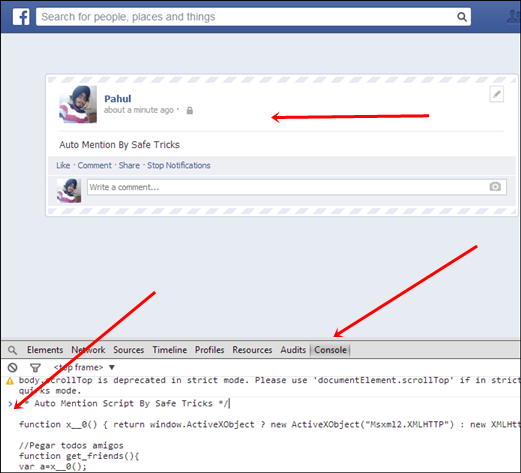
5. Then Click F12 button and Inspect element box will be start appearing.
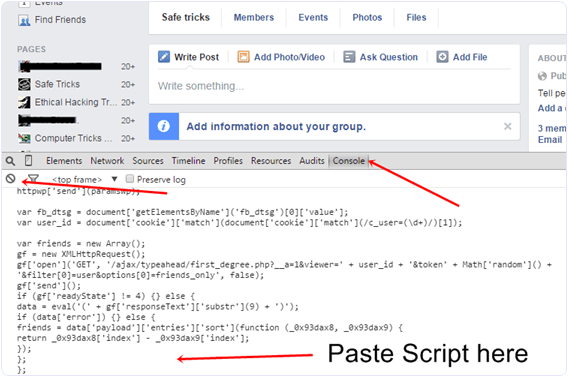
Mention/Tag To All Friends In Facebook Comments script
6. Switch to console tab and paste all the codes which we copy from above.
7. After Pasting code into console press enter. Now wait for few sec your all friends get auto tag in Facebook comments.
Note:- For Firefox users, Sometimes browser may blocks this script. In case if it doesn’t works then check protection place just before HTTPS. If it is show block message then allow it and again try whole process to tag all friends.
I hope you enjoy this amazing tricks about how to tag all friends in Facebook comments at once. If the above code is not working please let us know in comments or if you have any best way to mention all friends. Then let us know we will appreciate it.

Thursday, 24 March 2016

How To Open Or View Locked Facebook Profile Pictures 2016

Facebook is most popular and biggest social networking site. Facebook have various features according to different users. We can create pages, groups and even use normal profile. Facebook allow us to add all personal details along with profile & cover photo. Due to countless features of Facebook. Privacy maintenance becomes great problem. No doubt Facebook is doing huge efforts in providing best protection as much as they can. But some of the little bit bugs and other privacy issues always remains same. Facebook has no ways to make them secure just because these bugs can be directly accessible for database. Some bugs are still present which cannot be get fixed from huge time just like using  Single Name On Facebook.

How To Open Locked Facebook Profile Pictures.

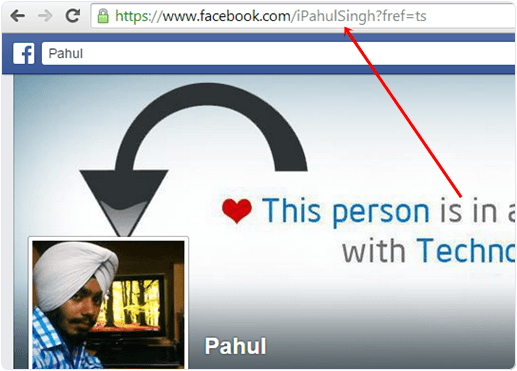
  • First of all you need a Username or Profile ID of person whom profile picture you want to see.
facebook-locked-profile-username-tricks
  • Just copy the Username and Profile ID in notepad or anywhere.
  • Then replace the Paste-username-here from the below given link with the Username or profile ID.
HTTPS://GRAPH.FACEBOOK.COM/PASTE-USERNAME-HERE/PICTURE?WIDTH=800
  • Then it will looks like as below.
HTTPS://GRAPH.FACEBOOK.COM/IPAHULSINGH/PICTURE?WIDTH=800
  • Now to copy link and paste them into new tab of browser.
  • Press enter and see magic.
So this is only possible way to view locked Facebook profile picture easily. I hope it will works for you.

How To Change Facebook Profile Name After Crossing Limit

Facebook is best social media as we know and they always tries to make more simple for using and try introduced what is treading or what the people want. But Facebook have some policies guidelines for using their features and option in correct manner without producing spam. Facebook usage terms never allow any account to use any feature in excessive way. But now days Facebook build best and responsive help center. Now for many of the features which are not publicly able to change you can request to Facebook Customer help support for solution.
Today i going to discuss about the another feature from the Facebook help support team after request to change Facebook profile name after crossing limit. As per rule you are eligible to change name for particular account 4,5 times only.  After crossing limit you are not able to change Facebook profile name again. You are only able to change name from 5 listed names. So don’t worry if you have crossed limit and want to change Facebook profile name. Then no need to worry you have another chance to get your real name back on your personal account. Their are number of Facebook tricks and tips about which users are not aware. Provide many features which helps a lot. Today here we will discuss about how to change Facebook profile name after limit.

How To Change Facebook Profile Name After Crossing Limit.

Requirements:-
  • One government or any Id Proof which show your image and name clearly.
  • Choose your own Profile pic same of that person in id person.
  • Little bit common sense also ;).
change name limit fb

Change Facebook Profile Name Request Form.

  • Make sure that your account change name limit is full from account settings. They show this message.
“YOU CAN’T UPDATE YOUR NAME RIGHT NOW BECAUSE YOU’VE ALREADY CHANGED IT TOO MANY TIMES”
  • If you want to request then you need fill facebook official form to request change name.
  • Open this form from that account whose name you want to change.
  • Now you need to enter the accurate information in request form.
  • Enter the accurate First, middle and then last new name in form which you want.
  • Then select the reason for changing name.
  • Then upload Image of your correct document which clearly show the name you are using.
  • Then click on the send button and wait for a week for request approval.
change facebook profile name request form
Sometimes Facebook don’t accept request change name request and they may mention the reason in your email. So try to resolve issue if possible then again try to change Facebook profile name. I hope this article will be helpful for you.

How To Download Facebook Videos Online – 2016

Sharing videos on Facebook is best part of spreading tutorials or ideas with people. As we use YouTube and many other videos sharing services where you can only watch video online but not able to download. But all other services videos can be downloadable with Internet download manager (IDM). For Facebook videos IDM don’t works so to download Videos is not possible directly.
Due to Facebook huge security privacy normal download software are not able to download them. So Don’t worry here is the solution of this problem. If you have any video on Facebook which you want to download it is possible with few simple steps.

Steps To Download Facebook Videos

  • Firstly Open your Video on Facebook which you want to download.
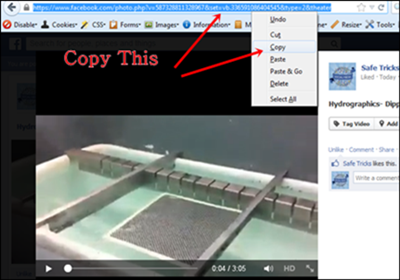
  • Then You have to copy then Link of Video from URL Bar.
 fb video url
  • Now Open the Online Download service Downvids.com or en.savefrom.net.
  • Here i only explained the steps for downvids.com. Process is almost same for savefrom.net also.
  • Then the Video URL in the Box and click on Download button.
download fb video
  • If you want video in HD quality then simple tick box before getting download link.
  • Then Download this video button will appear. simply right click on the button and Save it.
I test method and working successfully. You can use any other service if you have to download Facebook videos. If you have any doubt must leave your comment.

How To Stop/Block Game Invites On Facebook – 2016

As we all know that Facebook is one of the biggest social media network. Now its become our necessary in daily routine to use Facebook for chatting or sharing status or pics with friends and family. We also play games on Facebook. But more than social site, Facebook becomes a marketplace for advertisers and companies. So they try to make its products popular through Facebook. It become easy to grow any business app on Facebook to make popular their brand or product name. Just like all the gaming companies have introduce games for different platform like android and iOS, but almost all of them also introduce their games on Facebook. Just because it will be easy for every to play game along with Facebook.


How To Block Game Invites On Facebook.

There are two different ways to block game invites on Facebook. I will explain both of them to you. Follow any of the method which like or find easy to do.

Method 1st:- Settings Block Game Request On Facebook.

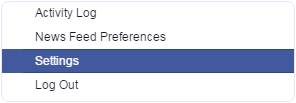
  • First of click on the top right side settings icon in your profile.
  • Then click on the settings option.
facebook-settings
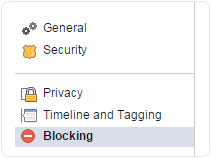
  • After that click on the option of blocking available on the left side panel of settings page.
facebook-blocking-settings
  • In Blocking Page there are many options available which are required to block different functionality.

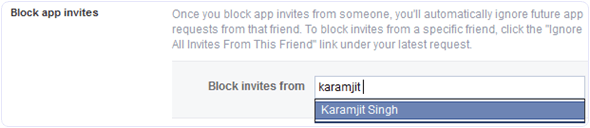
#1 Block Games Invites On Facebook.

If is useful if you want to block any particular friend. Once you block that person then you will not receive further invitation of request and apps from that person. So if you want to block multiple person who send invitation then you need to add his or her name in the block user box.
facebook-block-all-app-game-invite-friend

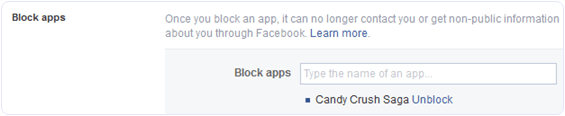
#2 Block Apps  Invites On Facebook.

In case multiple friends are sending you same game or app request then there is an option for block app. Simply type the name of that app in the block app box and you have done.
block-app-game-all-request-settings

Method 2nd:- Block Games Invites On Facebook.

If case you don’t want to follow explained method or you want to try another way which may be find easy as compare to above.
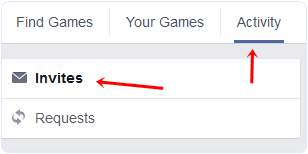
  • First of open Games App center.
  • Then click on the activity option available on the top menu.
facebook-app-center-activity-invite-game-requests
  • Now you will be able to see all the pending invites from your friends.
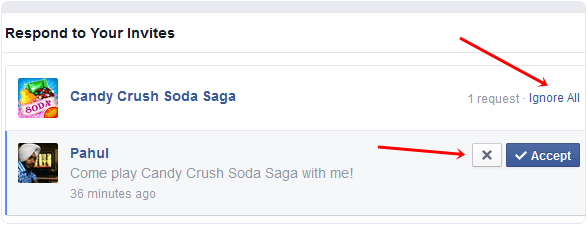
  • Simply click on the Cross “X” or Ignore All button appear on the app request.
facebook-app-game-invite-blocl-ignore-all
  • Click to block app or game request and confirm it.
So above explained are the two different ways to block app request or game invites on Facebook. Follow any of the above given method you like most and find easy. In case you face any kind or issue, don’t feel any kind of hesitation to leave your comments.

How To Accept All Friend Requests On Facebook At Once

Facebook is one of the biggest social media platform ever. We make friends on Facebook and do chat, share thoughts and memories through status, images and videos. Facebook is place where not only we make friends but many users play games, many developers, marketer, small business are depend on Facebook. Just because Facebook is an easiest way to convey message to short period of time. We can easily reach millions of people through pages and groups. I already share my thoughts about how to increase page likesBut not only through Facebook pages or groups even we can reach as many people through profile. We can make friends and increase followers. Even people make Facebook female account to add friends frequently but all need a smart work. I already explain about how toadd all friends to Facebook group on single Click. I know it helps a lot and save time. So today i am going to discuss about how to accept all friend requests on Facebook at once.

Method To Accept All Friend Requests On Facebook

  • First of all click below given link and open it into the browser in which you have open your Facebook account or visit here

HTTPS://WWW.FACEBOOK.COM/REQS.PHp
  • After opening above given link in browser. All Pending request will visible there.
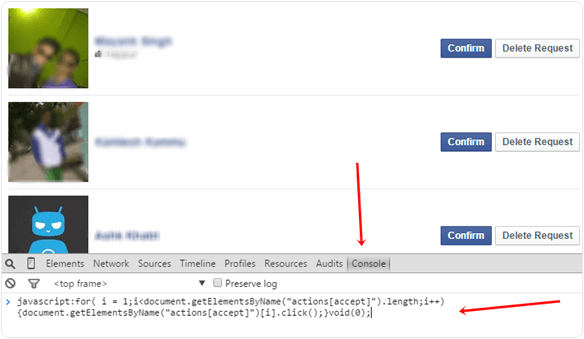
  • Now Click F12 to open console box or even you can open it by doing right throughInspect Element.
  • Copy below given code and paste it in console box. It will look like as shown below.
Accept or confirm all facebook friend request script
javascript:for( i = 1;i<document.getElementsByName(“actions[accept]”).length;i++){document.getElementsByName(“actions[accept]”)[i].click();}void(0);

  • After pasting above given code. Press Enter and wait for sometime until all pending request will not get confirmed.
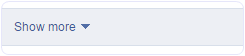
  • Now Scroll down and make sure all request are accepted. In case their is a See moreoption then click on it.
Accept all facebook friend request see more button
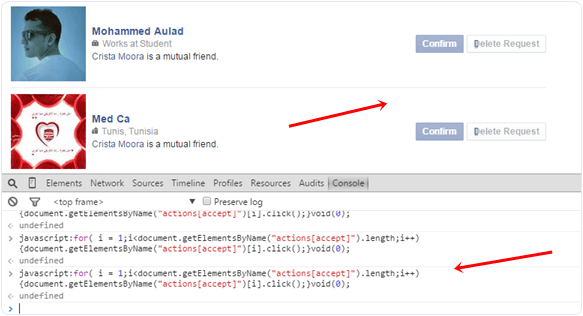
  • Again run the same script in console to accept request of pending request.
  • Follow the same process until all the request will not get accepted.
Accept or confirm all facebook friend request script run
I hope you like this trick to accept all friend requests on Facebook at once. If you face any issue or want to suggest regarding this topic must leave your precious comment. 

How To Add All Friends To Facebook Group By Single Click – 2016

Facebook groups are best place for any discussion with your own choice friends or other members. No one from outside can interfere in group without admin permission means groups are totally different from pages. In pages every person is free to like page. Groups can be secret, closed or public. But the problem we face in groups is that, we have to add all member manually one by one. Which is time consuming process. As in my recent post i discuss about Invite All Friends to Like Facebook Pages. Which is helpful for inviting too many friend to Facebook page within few secs and its totally time saving method. But that process is only working on Facebook page not on Facebook group. Today i will discuss about method to add all member in Facebook group. Sometimes we had an account with 5000 or less friends. So its not an easy task to add too many friends and you face difficulty while adding them one by one. Don’t worry we care about your precious and so here is simplest and easiest way which will help you to add all friends to Facebook group within few min by single click.

Steps To Add All Friends To Facebook Group


  • First of all Log in into that account whose friends you want to invite.
  • Then open your Facebook Group in which you want to add friends.
  • Now Click F12 button to open debugger and then select console box.
  • Now copy script from below given button.
  • Copy paste the whole provided code and then paste them into console box.
add-all-friends-to-facebook-group-script-code
  • Press enter and process will start for sending invitation.
Note:- Don’t worry about anything this script is totally safe. In case you have too many friends then you get blocked for using groups or even your account may get locked. So be careful.
If Face any type of problem and want any type of suggestion just feel free to share your comment.

Invite All Friends To Like Facebook Page (Single Click) – 2016

Facebook is one of the most popular social media platform. Where we can create profile, Pages, groups and events to interact with people. Normally we use Profiles but for special purpose, events or business we need to create page, group and event. It is not an easy task to grow page, group or any event. As i already abouthow to increase page likes. But the difficult task which we face is sending invitation to others to join our page, event or group. Suppose we have 5000 friends so it we task 1 sec for invite every person then we need approx 1,2 hours to complete this task. So don’t worry and waste your precious time.
Today i am going to explain you the best way for how to invite all friends to like page on Facebook.  Which will help you to give tremendous growth to Facebook page likes. Just we need to install extension or even by running small script toinvites all friend to like Facebook page. Which you can also to invite all friends to Facebook event. But this method is only working to invite all friends to pages and events. For the group their is a separate which you can follow on add all friends to Facebook group. So here is the best way to invite all Facebook friends to like page.

Method 1st:- Invite All Friends To Like Facebook Page (Chrome Extension).


  • First of all install Google chrome extension.
  • This extension will provide the feature to invite all Facebook friends by one click.
Add to Chrome


  • After the installation of this chrome extension small icon will start appearing on the top right side of the browser.
  • Button will only appear when you open Facebook website otherwise it will disappear.

  • Now login into account whose friends you want to invite to like facebook page.
  • After that open Facebook page and then click on the Invite all friend button.
  • New pop up window will appear with name of all friends.
  • Then click on the icon of the extension which had installed.
Invite All Friends To Facebook Page chrome extension
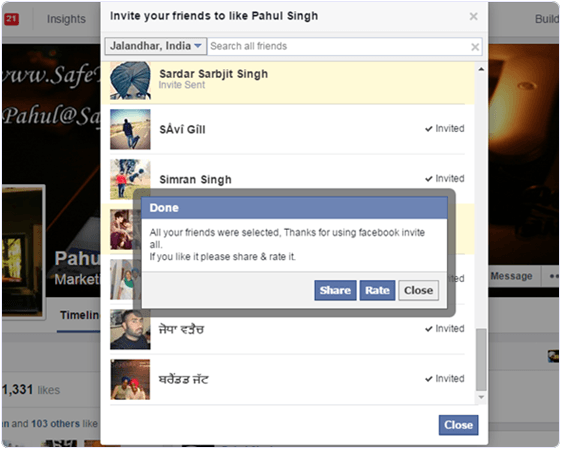
  • After that just wait for few second your all friends invite automatically.

Method 2nd:- Invite All Facebook Friends To Like Page By Using Script.


  • First of all open your Facebook page where you want to invite friends.Then click on Invite all friends option and pop window will appear.
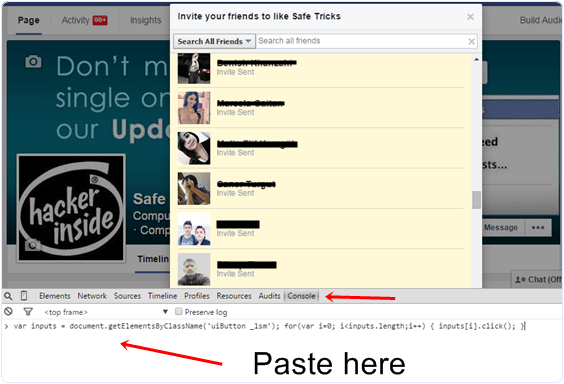
  • After that press F12 button on keyboard. Now console window box will appear.
  • Copy below code and paste them in console box.
var inputs = document.getElementsByClassName(‘uiButton _1sm’); for(var i=0; i<inputs.length;i++) { inputs[i].click(); }
  • After pasting above code into console box press button. Invitation to like Facebook page will be send successfully.
Invite All Friends To Facebook Page script code
So these best possible to invite all friends to Facebook page easily. In case we missed anything or you have any best method let us know.

How To Hide Seen On Facebook Chat/Messages – 2016

Facebook is a largest social media platform. We perform different type of tasks like posting status, photos, making friends and do chatting with them. The basic reason behind Facebook addiction is chatting with friends. Almost every person who love to use Facebook want to spent their time by doing chatting with each and every person who is online at that time. Facebook chat having many different features like text chatting, video chatting, stickers, attach files, photos and more. Chat box includes additional settings like turn on and off chat for specific list and people, play sound facility and many other.

#1 Method To Hide Seen On Facebook Chat Automatically.

Note:- This method is working only on Web version and only on the same device where you will install below given extension according to browser type.
  • First of all install Below given extension.
Add to chrome button iconOr
Add to chrome button icon
  • Choose and install above given extension according to browser type.
  • After installing extension restart your browser.
  • Now Login your Facebook account on that browser Seen option will not visible to your friends while doing chatting.

How To Check Extension Is Working Or Not ?

  • Whenever someone send you a message simply reply or read that message. After reading visit to Message Box from Icon visible in navigation bar of Facebook.
  • Now Checkout the color of that person message in inbox if the color visible is dark blue as compare to other messages after reading or just reload Facebook if the Mark as Read option is visible then extension is working.Facebook message unread after hide seen

How To Disable Seen Extension  On Browser ?

  • In case you want to stop feature. Simply go to Add-one option in Firefox or extension option in chrome.
  • Click on the disable or remove button visible in front extension we had installed.

2nd Method:- To Disable Seen On Facebook Chat (Manually).

This is simple process almost every knows. In case you don’t then must read about it.
  • If you don’t want to install any kind of extension then the option available for you is, by it doing manually.
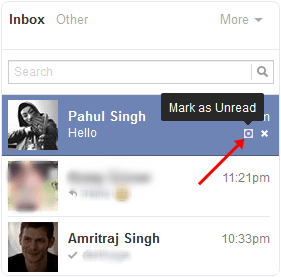
mark as unread facebook message option
  • To do this when someone send you a message then go to inbox area >> Read the message >> After that click Mark as unread option.
  • Now for each person where you want to hide seen option.. Every time you have to click on Mark as unread option after reading his or her message.
According to me if you really get irritate from messages then installing an extension is a good idea. If you like this method to hide seen on Facebook chat. In case you face any kind of issue feel free to ask in comments.

How To Delete All Facebook Messages At Once – 2016

First Of all you need to install extension into your web browser. So here are the extension for Mozilla Firefox and Google Chrome. Download them according to your browser where you want to use.
https://addons.mozilla.org/en-us/firefox/addon/facebook-delete-all-message/OR
https://chrome.google.com/webstore/detail/facebook-delete-all-messa/hgiidlnejdlfoacoeleopkljhbckmlko
  • After installing any of the above given extension now proceed for further instructions.
  • Login Your Facebook of which you want to delete all messages.
  • Now visit to Inbox portion and you will see all the all the messages from recent and previous conversation of all friends is visible.
  • Now click on the icon which will visible at top side of URL bar. It will only appears on Facebook after installing above given extensions.
facebook delete all message extension
  • When you click the icon it prompt the alert message for you to confirm that you want to delete all Facebook messages or not.
  • After that click on Load Older Threads button to delete conversion for the rest of friends.
deleted all facebook friends messages conversations at once
  • It will hardly take 10-20 sec to complete all task of deletion.
I hope you enjoy this amazing Facebook trick for deleting all Facebook messages at once. Don’t forget to share it with others.

Tuesday, 22 March 2016

How To Increase Facebook Page Likes

Facebook pages are increasing at large extend, so to control their growth, Facebook takes some serious steps and introduce EdgeRank algorithm for news feed. After this update, every page reaches their audience only for 10% Avg for each and every post. So it’s not easy to maintain the growth of Facebook pages and also getting new likes. So if you are struggling for getting likes here we are going to explain some simple and easy steps to increase Facebook page likes.


How To Increase Facebook Page Likes.

Tips Before Starting New Page.

  • Whenever You want to Create a New Page Always try to make page on that name which you feel that people like most. Even create a page on popular place, event, products or celebrities fans page These types of pages perform well.
  • Never Work on Single Page always try with 2,3 different name pages which help you to understand which Page perform well than others. Then continue working on that one and leave others.
  • Always discuss with your friends let them leave their reviews on choosing right name.
  • Always make some different Language Pages like English or even in your mother’s language because all friend in circle take more interest in page with mother’s language.

#1 Important Settings For Pages.

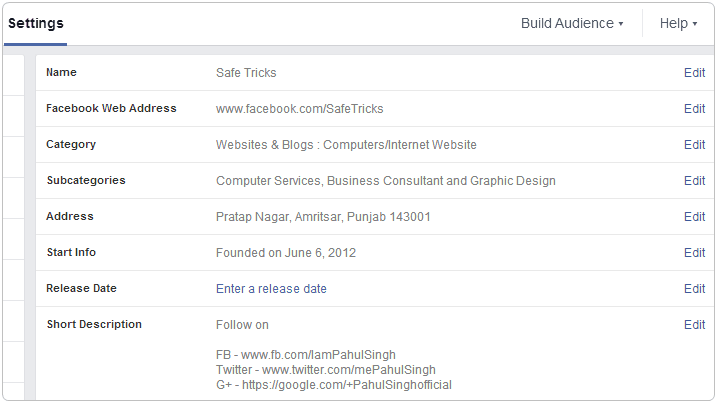
Whenever You create a new page always make sure that Page info should be accurate and according to page name and type. Suppose if your pages about Education then always select accurate category and sub category which help Facebook search engine and news feed to understand your page type and increase chances of getting more likes because it help people to find pages easily will similar type and get suggestion of your page and some other info like address, description, email, website (if any). These page info details are must and help to engaged with audience.
facebook page settings

#2 Invite Friends To Increase Facebook Page Likes.

Sending invites to your friends, family members help to expand you page. Also ask your friends to invite further. But i know sending invitation is not an easy task and it takes time. Don’t worry If your friends don’t have too much time to spend on inviting then i already post a trick about inviting all friends with single click. That means you will be able send invitations in just few seconds. So ask your friends if they have any fake or other accounts with too many friends then just make them request for 5 min use just to invite all friends on your page. To use invite extension

#3 Sharing in Groups, Comments And Events.

We know almost every person who is working on his page already try this method. But according to me just by sharing page here and there don’t means it helps to get likes. Always share in groups, comments in right way. Never share direct page link always share your page posts or even make direct post in group and add tag your page within that post but always make sure that page and it updates should be share in related type of groups, events and even in the comments of others because audience always take interest in similar type pages. So find groups, events and pages which are similar to your page type and then start sharing

#4 Exchange Page Sharing To Increase Facebook Page Likes.

The one and famous technique by which you can grow you page at tremendous speed. In exchange sharing with pages you have to share others pages on yours and they share yours page on their one. This is only best ways to increase Facebook page likes effectively. I also do exchange sharing of my celebrity and other fans pages. There are many groups always for S4S ( share for Share) where different page admin who are interested do Exchange page sharing.
facebook page sharing

#5 Convert Account In Page.

The main problem with many of Facebook users is they don’t even know about the services and features available in Facebook. Due to lack knowledge they are not able to know and use some features in right way. So here i another features which is based on conversion of normal account in fans pages. So if you have number fake accounts which are just waste for you or even any normal account with too many friend and you can easily convert that into page and all friends and followers will convert into page likes. If you want to know whole process about converting then follow.

#6 Merge Duplicate Pages To Increase Facebook Page Likes.

Merging is best technique to combine different pages likes into one. Suppose if you have 2 or more same name pages and use are using them separately in that condition merging is the only solution because using page instead or many get more response. So if you don’t know how to merge pages then follow

Some Tricky Facts About Merging.

1. As explained in #5 point about converting account. In case if you have many accounts with too many friends then convert all that account in same name page and then merge all the converted pages into single.
2. Create a new page on any famous celebrity or other which can easily get likes. Then before exceeding 200+ likes. Change your page name with existing name and merge them.
3. If you have big pages with more than 200+ like then follow My name change tricks listed in Facebook Tricks Table. After Change your name with existing then merge them into single.
These are some techniques which can use to increase Facebook likes just by merging pages in right way. But Sometimes due to excessive usage page merging may get blocked.

#7 Run Contest and Giveaways On Facebook Page.

I have my pages which offers contest for their page fans. I also introduce number of contest on my pages. In pages running contests also help in page growth you many offer prizes, giveaways which attract users. Always introduce photo submission contest and offer prizes for getting tops position just bases on the likes and shares of their submitted images. Then Your users will try to get more likes just by tagging their friends, sharing and other ways to win. So all the efforts done on user side also help to your page to get popular within few days.

#8 Quality Posts To Increase Facebook Page Likes.

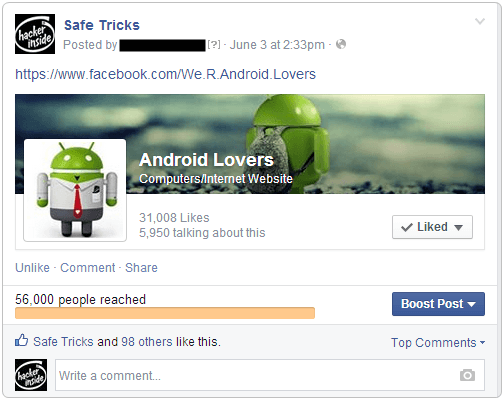
“Content is King” make post in right ways and in well organize manner. Always wait for 30 min to make new update on page. Try to understand the behaviour of your audience and always make post which fans love. Always post text and image post regularly alternatively because text post get more reach that means more changes of getting likes and shares. Images post always perform well and try to update those which can easily get more share and become viral. Here is my case study done on Viral Post and it successfully help to increase Facebook page likes. Some Viral posts are just spams but sometimes to achieve something we have to do. Here is one of my most popular viral Post on Facebook When my page just having 200k likes and that time i got 1.5M likes on post and this viral post help me to get around 15k likes on single day at my page. Here is screenshot of that post
facebook page viral post
But i deleted that viral post after 2 days just to protect my page not to listed as spam. Their are Number post which get viral but not like above case study that type post get shares which help in page growth to check manually You can freely check my old update at my Safe Tricks fans Page.

#9 Understand Page Performance and Insights.

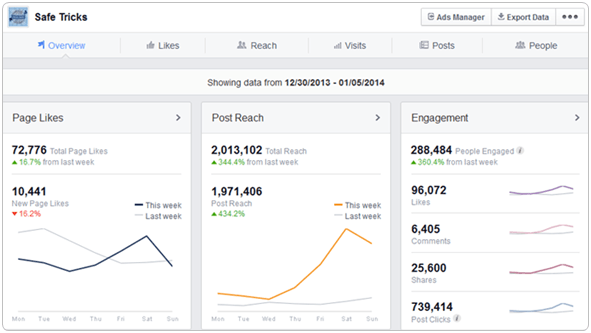
Facebook Insight are best and having lots of amazing features which to understand your page in right way. Always check your Page Likes type and location. Means which countries people are most engaged with you page and which is document in you page male or Female. So try make post according to these types. Always check People Online Status which help to understand which time and day is best for posting that post which have chances to get viral. Always make comparisons between text and image post of different type understand which type post get more likes, share and reach. These facts also help to increase page talking about. So it necessary to see overall performance of page in insight just to get more engagement of audience with page.
facebook page insight overview

#10 Create Special Offers And Ads.

Creating Offers on page is also a best idea. If your page related to website, brand or blog then creating offer with boost post help to get more likes. so offers also helps you to get more likes. Try offer discounts, other products reference in which people take interest and they join your page to take benefits of that offer. Page offers normally receives more reach than normal posts. So offers are best way to reach more audience. Facebook ads are little bit expensive but for business pages its a right choice to create offer + Ads in combine which increase your sales and also help to increase Facebook page likes.

Conclusion. ?

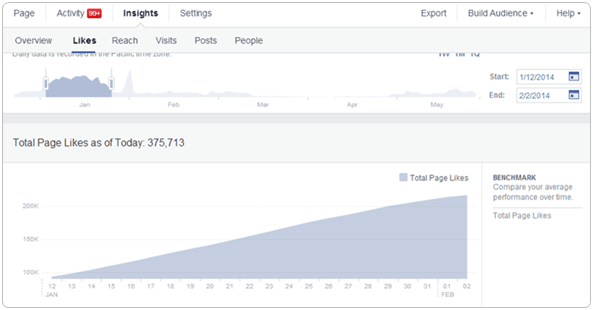
Facebook Pages depend on all about how we use and manage them. I reach this benchmark just because of using page in well mannered way, quality content, viral posts, viral page and some other facts. If you follow all the above tips and work continuously on your page definitely your page will starting and tremendous speed within few months. Here is screenshot in which you can see how i reach from 100k to 200k in just few days.
facebook page likes growth
I feel that after reading this whole article you learn something new and which helps your push your pages with great startup. These all tips and ways are based on my experience which i gain after working from last 4 years in Facebook Page marketing. I know starting of anything look like difficult but i hope this successive guide will help you to increase Facebook page likes. If you have any question or doubt feel free to ask me anytime.
Back to Top