Showing posts with label Mobile Software. Show all posts

Tuesday, 22 March 2016

How To Use Whatsapp Without Mobile Number

Whatsapp is a very popular messenger app these days. Using whatsapp we can keep in touch with our friends and relatives. We can also make different groups in whatsapp to share different things among different kinds of people. Using whatsapp we share images, audio, video etc with our friends. Whatsapp become commonly used app by all different age groups. We its really easy to use whatsapp on smartphone. Because its really easy to handle whatsapp and to understand its features. But we should be aware of some important features and settings about whatsapp. As we use whatsapp on our smartphone. No doubt smartphone is personal device but our friends and family can easily access. Sometimes by mistake they format smartphone data. In that situation our whatsapp data also got erase. So you can easily recover delete whatsapp messages by following few steps.

Method To Use whatsapp Without Mobile Number.

Step 1. Firstly you have to download whatsapp messenger in your Android device and install and launch it.
Step 2. If you are old whatsapp user then you have to delete your whatsapp account and download and install whatsapp again.
Step 3. Next step is enter your name and verify your mobile number. But you do not enter your mobile number now.
Step 4. Then we have to verify your mobile number with another way. Download Text+ App in your mobile to verify your mobile number.
Download Text+ Step 5. After launching text + App you have to open the App and go to settings and select contacts.
Step 6. You will get a number for your personal use in the app. Copy that number or write it .
Step 7. Now open your whatsapp messenger and paste the number that you get from the text + App.
Step 8. Click on continue button now you will get a verification code in Text+ app.
Step 9. Get this code and verify your account. Now your whatsapp account is ready without any number.
add new unknown number to whatsapp without number
I hope you like this tutorial and learn how to use whatsapp without mobile number. In case you face any problem regarding this topic please let us know in below comments.
How To Extract APK File From Android Phone

Method 1st:- Extract .Apk By Using APK Extractor.

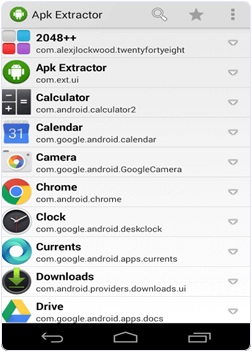
Android APK Extractor appApk Extractor is one the most popular Android Application which is Available on Google Play Store for free. This Application allow you to extract .apk file from installed App in any Android device. It also allow you take backup of any App and move it into SD card or another device like computer and Laptop and also allow you to upload into Google Drive. Approximately 5 Million install this App. After getting the .apk file you can share it with others. It is a easy to use and fast application which allow
  1. Extract all most all Applications include system Inbuilt application.
  2. NO device rooting of Android is needed.
  3. It provide search option to search different applications.
  4. It can extract multiple Apps files together.
  5. Compatible from Android version 2.2 to 5.0.

Steps To Extract .apk With APK Extractor.

1. Install Apk extractor into your Android device using the Button given below.
Download Apk extractor
2. You can also download file manager to find the .apk file after extracting the file. By default the files are stored in /sdcard/ExtractedApks/.
3. Open the Apk extractor App on your device.
4. After launching the App you will see a list of installed Applications on your Android device.
Android APK Extractor app settings
5. Select the App whose .apk file you want to get.
6. You can also share the apk file tap and select the share option.
7. Tap the menu button-> then setting to change the path where you want to save .apk file.

Method 2nd:- Extract .Apk By Using ES File Explorer.

Android ES File Explorer appEs file explorer is one the famous file manager available on Google play store for free. It not only manage the files but also perform various tasks like download manager, task killer, cloud storage client, file sharing etc. It is available in 30 different languages. It is compatible with all Android versions. It also provide built in support for text, images, audio, video, Rar and Zip files. It can act as file manager, App manager, task manager, Bluetooth file browsing and sharing, text and photo editor. One of its most important feature is extracting .apk file from installed Apps and provide backup and sharing facility also. Approximately 300 Million users install this App. It provide easy to use tools and attractive interface.

Steps To Extract .apk File Using ES File Explorer.

1. Install and download the Es file Explorer into your device by clicking the following button.
Download Es file Explorer
2. Open the and launch the App in your Android Device.
3. After Launching the App navigate to the tool menu.
4. In the tool menu select the application manager.
Android ES File Explorer app manager
5. In the application manager you will see a list of Apps installed in your device.
6. Select the App whose .apk file you want to get.
7. click on Backup and your .apk file will start extracting.
8. Browse the path where you want to save the file.
These are some best ways to extract .apk files in android phone. There are numbers method and apps available to backup and extract apk file to make it shareable.

Monday, 21 March 2016

Top 5 Internet Browsers In The World

Internet Browsers are the first step for surfing internet. Its use are not so different. But extra features and add-on create a browser better than other. The foremost demand of a user is to get the fastest speed of surfing internet and gathering information.

The first specialty of a good internet browser is to be light to load. With a light and less cache, surfing is of more sustainable and enjoyment. Review of top 5 Internet Browsers are described briefly downward.


i. Mozilla Firefox: It is the most usable internet browser of the world. It was fast and is being faster day by day. The security of this software has made this is the best Internet browser. It protects from virus, malware and spyware. Anyone who wants to get protection over internet, should use this internet browser. It has been developed with great intuition. Spell checker and shadow view are the latest feature for this website. If your password is being forgotten by you regularly, this Internet Browser will manage your information on command. So, it is easy to use.

ii. Google Chrome: This is developed by great Google team. It is being improved day by day. The latest version of Google chrome browser has been more secured and faster. It is now running tabbed surfing. You can get extra priorities while using private browsing. Moving from one page to another has become easier. Pop-up blocker is the new feature of Google Chrome. Nice looking interface has made this site user-friendly. Menus are being customized with icons.


iii. Internet Explorer: Microsoft Windows default browser which is called Internet browser. It enhance the surfing experience. Plug-ins have created this website furthermore favorite for Windows users. You can now use this browser not only to surf, but also to download with a faster speed. Its features are unquestionably good and easy to use. With less cache loading, surfing has become faster. You can now easily save your pages and bookmarks. It will automatically delete cookies when it is scheduled.

iv. Opera: A compatible software which is light and can do multi task is Opera Internet Browser. It is famous for fastest speed. It’s a multimodal internet browser which indicates that it is enabled for multi-mode tasks. It has extremely stunning look and bookmarks option is very useful. Its security is more developed than before. It checks for malware and spyware in any websites. The Internet browser has site-blocker option. You can now block unnecessary contents with this option. The redefined interface has bring Opera to 4th place in top 5 Internet Browsers review list.

v. Safari: Apple developed Safari as the default and light web browser. It is easy to use and fast internet browser to surf in the internet. Safari is different from other internet browser from its interface. The interface is not luxurious but simply beautiful. It contains the feature of spelling check and password manager. Safari is the best widget for any Apple device.


From the above top 5 internet browsers review, choose your desired one. Browse internet with more comfort and enjoyment. To download your chosen internet browsers from the above, search on google.com by typing the name of the chosen internet browser.
Back to Top