
Internet is used in each and every field which require sharing of resources. Internet is used in Business, Banking, Education, Entertainment, Medical, Marketing etc. We use internet to share our information with others and keep in touch with our relatives and friend. As a student it becomes easy to learn online like we don’t need to buy hard copies we can read from eBooks. There are manybest website to download eBooks. Without Internet we can not imagine modern life. We use internet for playing online games, online shopping, watching online video, download audio and video files.Whenever we want to download something, by default it get started within browser. Browser download manager don’t have good speed and even resume capacity or other advance features.
Everyone wants to increase his download speed to download audio, video and some other things early. There are various types of tools to increase our internet speed. IDM that is Internet Download Manager is one of them. IDM is an efficient tool that divide our download file into segments and download each segment individually to increase our download speed and its smart capabilities can automatically fetch the download link in the page. IDM is very popular download manager but its efficiency can also be enhance more by changing some settings. If you do not know how to increase IDM download scheme then don’t worry because in this article we provide you some method to increase IDM download speed.
 Step 2. You must ensure that the IDM is installed.
Step 3. Run the IDM optimizer to see its operational Window.
Step 4. In the operational Window you see the two buttons as shown below in the image.

Step 5. Click on the optimize button to increase IDM speed.
Step 6. Before clicking the button you must ensure that IDM is exit from the system tray.
Step 7. Click on the restore button to restore the default settings.
Everyone wants to increase his download speed to download audio, video and some other things early. There are various types of tools to increase our internet speed. IDM that is Internet Download Manager is one of them. IDM is an efficient tool that divide our download file into segments and download each segment individually to increase our download speed and its smart capabilities can automatically fetch the download link in the page. IDM is very popular download manager but its efficiency can also be enhance more by changing some settings. If you do not know how to increase IDM download scheme then don’t worry because in this article we provide you some method to increase IDM download speed.
Method 1st:- Internal IDM Download Speed Settings.
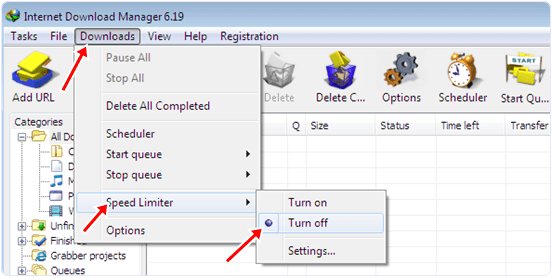
Step 1. Run the internet download manager if it is currently not Running. In the menu bar click look for the downloads option. Click on the it and under the sub menu click on the speed limit. After that select turn off to ensure that your next download will run on full speed.

Step 2. Open Downloads option again in the menu. Now click on the options. After click you see a dialog Window. In the Window click on the connection option and look for connection type/speed option. In that option select medium speed option with 3G so that IDM will utilize more connection bandwidth. Click on OK button to apply settings.

Step 3. For more IDM speed you must ensure that no other Application like U torrent and other browser are not download simultaneously with the IDM. In the download Queue you have to limit the number of task to one to three not more than three. After applying the above tips you will feel the quite change in the download speed.
Step 2. Open Downloads option again in the menu. Now click on the options. After click you see a dialog Window. In the Window click on the connection option and look for connection type/speed option. In that option select medium speed option with 3G so that IDM will utilize more connection bandwidth. Click on OK button to apply settings.

Step 3. For more IDM speed you must ensure that no other Application like U torrent and other browser are not download simultaneously with the IDM. In the download Queue you have to limit the number of task to one to three not more than three. After applying the above tips you will feel the quite change in the download speed.
Method 2:- Increase IDM Download Speed By Using IDM Optimizer.
Step 1. Download and install IDM optimizer.
Step 2. You must ensure that the IDM is installed.Step 3. Run the IDM optimizer to see its operational Window.
Step 4. In the operational Window you see the two buttons as shown below in the image.
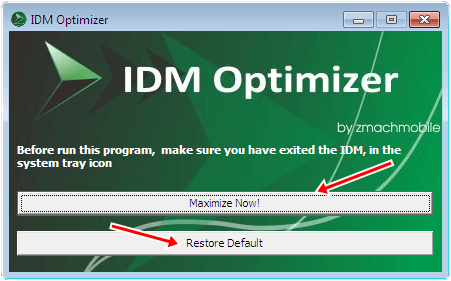
Step 5. Click on the optimize button to increase IDM speed.
Step 6. Before clicking the button you must ensure that IDM is exit from the system tray.
Step 7. Click on the restore button to restore the default settings.
These are best possible methods to increase IDM download speed. It don’t means speed will get beyond data limits. But sometimes others resources or settings may reduce to attain full speed. I hope this boost your idm download speed. If you like this don’t forget to share it with others.


