

Showing posts with label Delete. Show all posts

Thursday, 24 March 2016

How To Delete All Facebook Messages At Once – 2016

First Of all you need to install extension into your web browser. So here are the extension for Mozilla Firefox and Google Chrome. Download them according to your browser where you want to use.
https://addons.mozilla.org/en-us/firefox/addon/facebook-delete-all-message/OR
https://chrome.google.com/webstore/detail/facebook-delete-all-messa/hgiidlnejdlfoacoeleopkljhbckmlko
  • After installing any of the above given extension now proceed for further instructions.
  • Login Your Facebook of which you want to delete all messages.
  • Now visit to Inbox portion and you will see all the all the messages from recent and previous conversation of all friends is visible.
  • Now click on the icon which will visible at top side of URL bar. It will only appears on Facebook after installing above given extensions.
facebook delete all message extension
  • When you click the icon it prompt the alert message for you to confirm that you want to delete all Facebook messages or not.
  • After that click on Load Older Threads button to delete conversion for the rest of friends.
deleted all facebook friends messages conversations at once
  • It will hardly take 10-20 sec to complete all task of deletion.
I hope you enjoy this amazing Facebook trick for deleting all Facebook messages at once. Don’t forget to share it with others.
Tuesday, 22 March 2016

How To Cancel/Delete Facebook Pending Sent Requests

Facebook best place for connecting with friends and family. At Facebook we send request and follower other account to get in touch with that person. Facebook have lots of greats features which help us to find and communicate with others in a better way. As we already discussed about various Facebook tricks. Even if some having lots of friends and followers on their account they can easily convert Facebook profile into page.  These pages having different functionality as compare to personal account. But it is not easy to increase likes until your get popular or viral. But if you are really struggling for likes then my few successiveTips about Increasing Facebook Likes may help you a lot.
Today i will explain you how to cancel or delete Facebook pending sent requests. 

How To Cancel Or Delete Facebook Pending Sent Requests. ?

  • First of Log in your account.
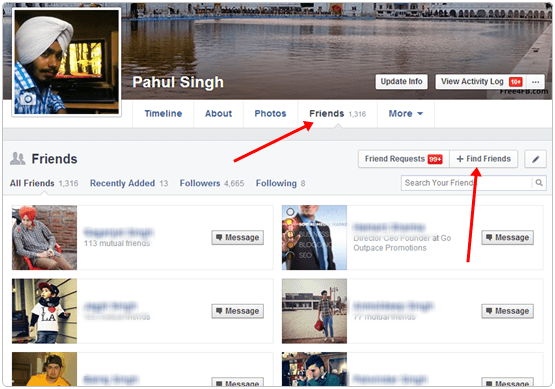
  • Then open your Profile and click on Friends Sections.
  • In Friend section there is an option for Find Friends open it.
facebook find friends
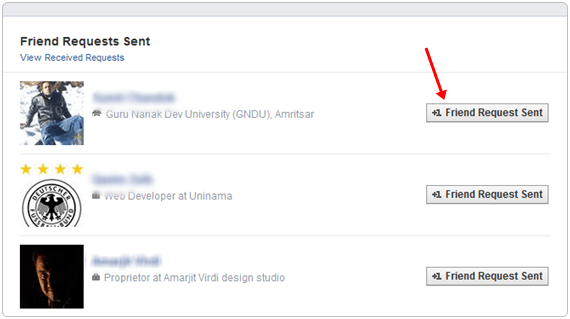
  • Now Scroll down their are Pending Receive Request Just there is an option for View Sent Request.
  • In case you are not able to find then Visit here.
  • List all people will appear whom you sent request and just cancel all of them and you have done it.
cancel all pending send request on facebook
I hope you like this Facebook tutorial and learned to delete Facebook pending sent requests easily.
Back to Top